

VESA Standard
vesa-adapter.com GUIDE
The VESA Standard: Which VESA Standard Do I Have?
? Updated: 02/03/2026 ✍️ Editor: Julius E. ⏱️ Read time: approx. 5 min.
Are you looking for the right monitor mount or want to determine your hole pattern? This guide leads you through the VESA standard to the correct mounting in 3 steps.
? Table of Contents (Navigation)
Step 1: Measure VESA & Determine Hole Pattern
The VESA standard (Video Electronics Standards Association) defines the exact distance of the mounting threads on the back of your display.
How to measure correctly:
?
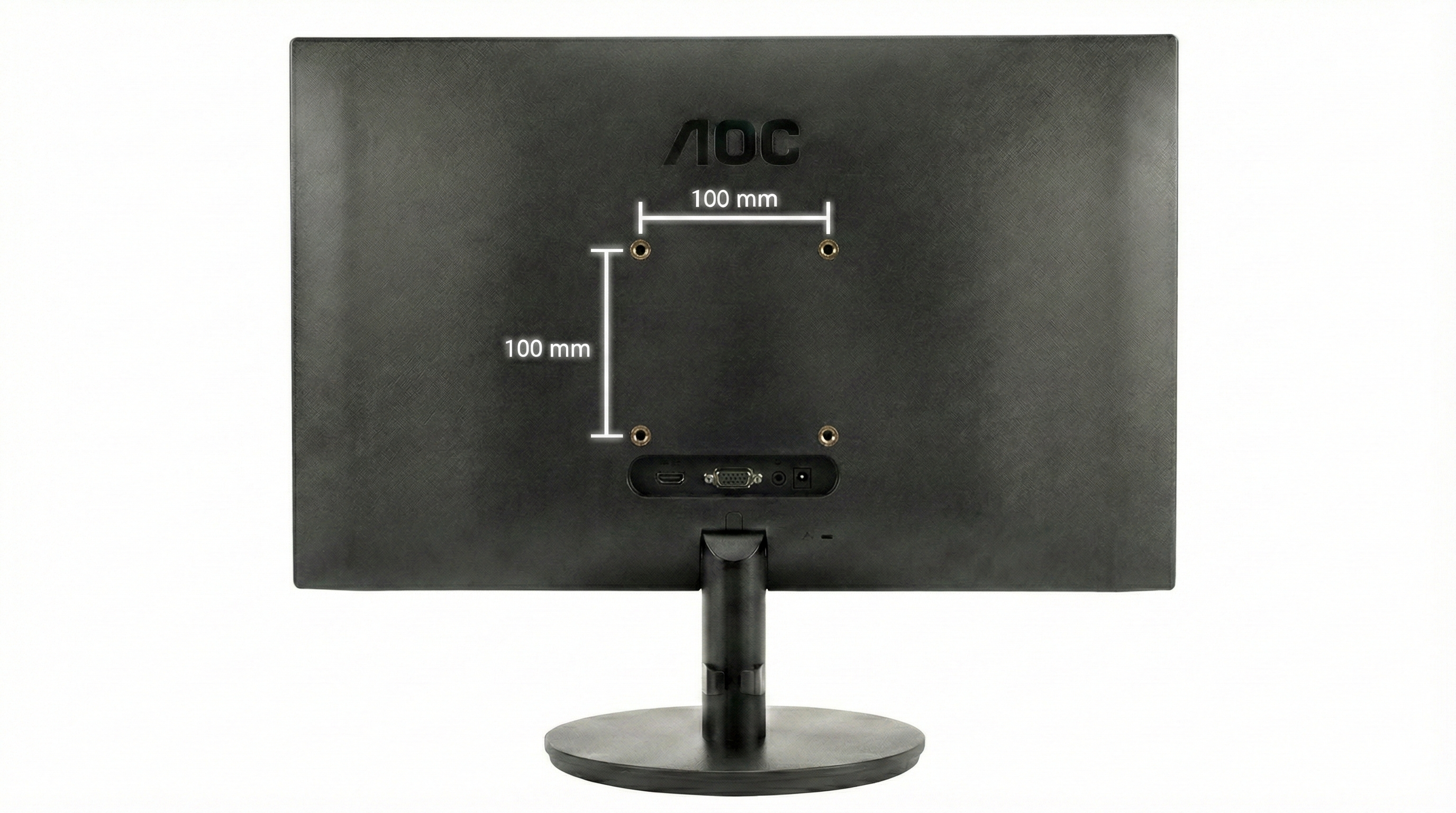
- Measure the horizontal distance of the thread centers (in mm).
- Measure the vertical distance of the thread centers (in mm).
- Result: Horizontal x Vertical = your VESA standard (e.g., 100 x 100).
Measuring without a tape measure? Printable VESA template here.
Open PDF ↓
⚠️ No VESA holes available?
For Apple iMac, Samsung Odyssey, or HP Slim models, the VESA grid is often missing. For this, you need a VESA adapter.
Step 2: VESA Standard Table (All Standards)
Compare your measurement with our VESA table. This classification also determines the required screw size (M4, M6, or M8) for your wall mount or desk mount.
| Standard | Horizontal | Vertical | Thread (Ø) |
|---|---|---|---|
| VESA 75 x 75 | 75 mm | 75 mm | M4 |
| VESA 100 x 100 (PC Standard) | 100 mm | 100 mm | M4 |
| VESA 100 x 200 | 100 mm | 200 mm | M4 |
| VESA 200 x 100 | 200 mm | 100 mm | M4 / M6 |
| VESA 200 x 200 | 200 mm | 200 mm | M6 / M8 |
| VESA 200 x 300 | 200 mm | 300 mm | M6 / M8 |
| VESA 200 x 400 | 200 mm | 400 mm | M6 / M8 |
| VESA 300 x 200 | 300 mm | 200 mm | M6 / M8 |
| VESA 300 x 300 | 300 mm | 300 mm | M6 / M8 |
| VESA 400 x 200 | 400 mm | 200 mm | M6 / M8 |
| VESA 400 x 300 | 400 mm | 300 mm | M6 / M8 |
| VESA 400 x 400 | 400 mm | 400 mm | M6 / M8 |
| VESA 500 x 400 | 500 mm | 400 mm | M6 / M8 |
| VESA 600 x 200 | 600 mm | 200 mm | M6 / M8 |
| VESA 600 x 400 | 600 mm | 400 mm | M8 |
| VESA 800 x 400 | 800 mm | 400 mm | M8 |
| VESA 800 x 600 | 800 mm | 600 mm | M8 |
?
Caution with Curved Monitors
With curved monitors, the center of gravity moves forward. Due to the increased leverage effect, we urgently recommend a mount with a higher load capacity reserve so that the screen does not sag.
Read more in the technical guide ›
Step 3: Choose the Right Monitor Mount
Choose the appropriate category based on your measured VESA standard:
___254_0_590612.jpg)
-(volle-beweglichkeit--vesa-75x75-100x100-mm--bis-15-kg-traglast-%E2%80%93-inkl.-wasserwaage.)___229_0_375086.jpg)
Frequently Asked Questions (FAQ)