

VS100-YG7 VESA adapter
This VESA adapter is compatible with the following SAMSUNG monitors : C27G73TQSR G73TF G75 G75T LC27G74TQ LC27G75TQ LC27G75TQSEXXP LC27G75TQSNXZA LC27G75TQSRXEN LC32G75T LC32G75TQ LC32G75TQSEXXP LC32G75TQSRXEN LS27BG650EU LS27BG650EUXXU LS28AG700NNXZA LS28AG700NUXEN LS28AG702NU Odyssee G6 Odyssee G65B Odyssee G7 Odyssee G70B Odyssee G70NC Odyssey G70A Odyssey G7A Odyssey NEO G7
⚠ WARNING
To minimize the risk of injury, it is important to read all instructions carefully before installation. We accept no liability for personal or material damage caused by improper use of this product.
Also, be sure to observe the technical specifications of the product.
1. Read all instructions thoroughly.
2. A faulty installation can lead to damage or serious injury. Ensure that the product and the monitor are securely mounted before use.
3. Make sure that the mount to which the product is attached can easily support the total weight of the monitor, computer, and adapter.
FAQ - Frequently asked questions
Technical Specifications
- Maximum load capacity: 30 kg / 66 lbs
- VESA standard compatibility: 100x100 mm
- Material: Steel
- Rotation angle (Pivot): 90°
- Maximum operating temperature: 50°C / 122°F
- Maximum ambient temperature: 50°C / 122°F
Important Safeguards
 |
Please read this manual carefully and keep it for future reference. If you pass the product on to third parties, this manual should always be included. Ignoring these instructions may result in injuries or damage to people and products, for which we cannot accept any liability. |
||||||
IMPORTANT - KEEP FOR FUTURE REFERENCE.
• The use of this product should always be in accordance with the specified safety instructions.
• Do not install your VESA adapter in combination with the monitor in places where people are located below.
• Do not exceed the maximum weight of the compatible monitor models, as this may result in serious injuries or property damage.
• Pay attention to the maximum ambient temperature of 35°C when using the product.
• Do not mount the VESA adapter near a heat source or in direct sunlight, as this may cause the adapter to overheat.
• Check if your mounting point (e.g., monitor arm) can support the weight of the monitor with the VESA adapter.
• The product is designed exclusively for mounting with a hole pattern of 75x75 / 100x100mm / 200x200mm.
• After installing the VESA adapter, the position of the monitor must be readjusted to ensure proper ergonomics.
⚠ WARNING
Ensure that the device is turned off and disconnected from the power supply before installation to avoid possible injuries or damage.
1. Before First Use
Check the product carefully for possible transport damage and for the absence of accessories, such as screws, which should be included in the scope of delivery.
⚠ CAUTION
Make sure that packaging materials and small screws and parts contained therein are inaccessible to children to minimize the risk of choking and other risks.
2. Maintenance and Cleaning
2.1 Maintenance
- It is recommended to check every three months that all screws are still tight. Also, regularly check the condition of all components of the product.
- Store the product in a cool and safe place, ideally at a maximum storage temperature of 40°C. For additional safety, keep the product away from children and preferably in its original packaging.
- Avoid any vibrations and shocks so as not to affect the life and functionality of the product.
2.2 Cleaning
- No corrosive or hot cleaning agents should be used to clean the product. Likewise, wire brushes, metal or other sharp materials are unsuitable for cleaning and should not be used.
- For gentle and effective cleaning, the use of a soft, damp cloth is recommended.
3. Waste Disposal
For the disposal of this product we recommend to contact the responsible local authorities or disposal services. They can provide you with detailed information on available disposal options and recycling centers in your area.
4. Manufacturer Information
3idee S.à r.l.
19 Rue de Bitbourg
L-1273 Luxembourg
Luxembourg
mail: info@3idee.eu
5. Help and Feedback
If you need help with your article, we are here for you. We also appreciate any feedback.
https://help.3idee.eu/en/contact
Scope of Delivery Accessories
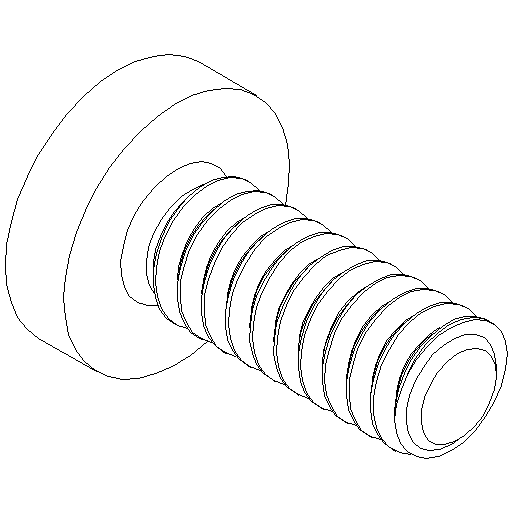
4x M4x8 screw with cross slot (M-A)
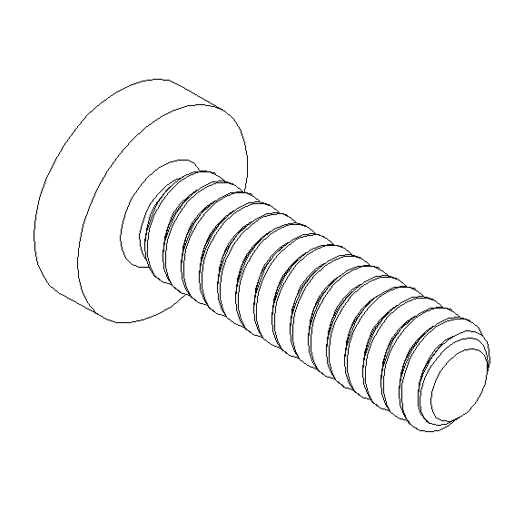
4x M4x12 screw with cross slot (M-B)
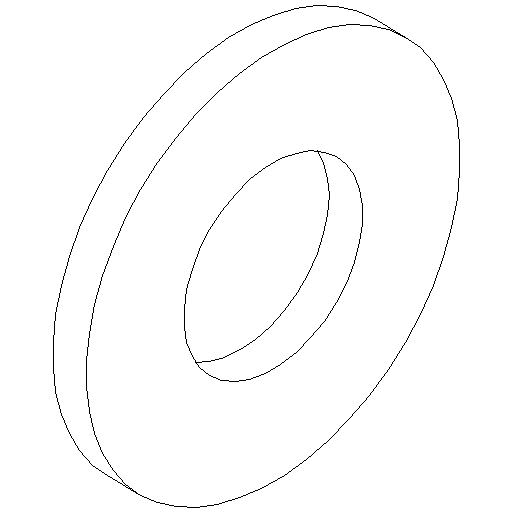
4x Flat washer for M4 (M-C)
⚠ NOTE: Please check before assembly that all accessory parts are complete. If anything is missing, please contact our customer service immediately by email or phone. We are happy to assist you.
Horizontal / Vertical Alignment
⚠ NOTE: Not all VESA adapters and monitors are designed for a vertical (portrait) orientation. This limitation is often due to the specific geometry of the adapter or monitor. Do not ignore this information, as the load limit of the adapter can be quickly exceeded if not mounted properly.
We are continuously working on developing monitors and adapters that are also suitable for vertical orientation.
By default, however, monitors are designed for a horizontal orientation.
Horizontal Mounting: YES
Vertical mounting: YES
Assembly Instruction
Step 1
Carefully place your Samsung monitor face down on a soft, clean, and secure surface (e.g., a blanket or foam mat) to avoid scratches or damage. Then, remove the stand by loosening the screws on the bracket and gently pulling the stand off.
Step 4
Position the VESA adapter precisely on the back of your Samsung G9 monitor.
Then, screw it in place using the included 4x M4x12 (M-B) screws. (Figure 1)
Make sure that all screws are tightened evenly and securely, without damaging the adapter or the monitor's casing.
VS100-YG9-pic1.jpg) Figure 1
Figure 1
Step 5
Carefully check that all 4 screws are securely and correctly fastened. The VESA adapter should sit firmly and without play on the monitor. (Figure 2)
Retighten if necessary – but do so gently to avoid stripping or damaging the threads.
VS100-YG9-pic2.jpg) Figure 2
Figure 2
Step 4
⚠ WARNING: We recommend performing this step with a second person for safety reasons.
Now position the VESA plate of your monitor arm on the mounted VESA adapter or carefully hold the monitor against the monitor arm. Then, secure both using the included 4x M4x8 (M-A) screws and 4x U-washers (M-C).
Make sure to align everything straight and tighten the screws evenly and firmly. (Figure 3)
VS100-YG9-pic3.jpg) Figure 3
Figure 3
Step 5
Carefully check if all screws are tight and secure at this point as well. The connection between the monitor, VESA adapter, and monitor arm should be stable and wobble-free. If necessary, tighten the screws evenly. (Figure 4)
VS100-YG9-pic4.jpg) Figure 4
Figure 4